How to choose between a VPS, dedicated server and GPU compute
Use workload, operating system, location, billing model and total cost to shortlist real GhostVPS plans. Includes a decision table, examples and a final order checklist.
Updated

You do not need the biggest server. You need a server that can run your software, fit your operating system and location requirements, and stay within your budget after all selected options are included. This guide gives you a short decision process for choosing between a monthly VPS, an hourly server, a dedicated machine and GPU compute. It is a category guide; for a detailed CPU, RAM and storage checklist, use our VPS plan comparison guide.
1. Write a one-minute workload brief
Before opening a plan list, write down: what will run, Linux or Windows, where users or connected systems are, whether the work runs continuously, and the monthly spending limit. Add measured peak RAM, storage use or GPU memory if you already run the application elsewhere. If you have no measurements, mark them as unknown rather than inventing a requirement.
For example: “A Linux web application and database, used mainly from Europe, running all month, with a $40 monthly listed-price limit.” That brief points toward a monthly VPS shortlist. “An AI model that needs CUDA for occasional experiments” points toward GPU compute, but only after you verify the model’s GPU and VRAM requirements.
2. Pick a category with this decision table
| Your situation | Start by comparing | Check before deciding |
|---|---|---|
| A website, app, development environment or small database that runs most of the month | Monthly Cloud VPS | OS, RAM at peak, CPU allocation, disk, traffic, location and total recurring cost |
| A short project, temporary environment or workload with uncertain running hours | Hourly VPS | Actual billing rules, charges while stopped, storage charges and your expected hours |
| A sustained workload that requires a specific physical CPU, disk layout or dedicated machine | Dedicated server | Exact hardware, setup cost, availability, provisioning and backup responsibility |
| Software that specifically needs GPU acceleration | GPU Cloud | GPU model, VRAM, software compatibility and all running, stopped and storage charges |
These are starting points, not automatic recommendations. A Windows desktop can be a Windows VPS; an email-sending system needs the specific Mail VPS conditions, not just any VPS. If the software does not use a GPU, a GPU server usually adds cost without solving the right problem. If the workload is continuous, compare the expected hourly total with a monthly alternative before choosing hourly billing.
3. Build a shortlist from actual available plans
Open the GhostVPS server finder. Select the workload, OS, region, minimum RAM and monthly listed-price ceiling. Treat its resource suggestions as editable planning estimates, especially when your workload is unfamiliar. Save two or three candidates, including at least one alternative category if the workload could fit both.

If location matters, use the location directory to check the exact country and city for the service. A country on a map does not mean that every product is offered in every city. Where a verified network test endpoint exists, test from a network relevant to your users rather than relying on geographical distance alone.
4. Compare the same facts on every candidate
For each shortlisted plan, record the plan name and link, location, OS, CPU description, RAM, disk, traffic terms, billing period, setup fee and selected options. Check whether a backup, Windows image or application is included or separately billed; do not infer that from the category name. The exact plan name matters because it is what you will see again in Console.
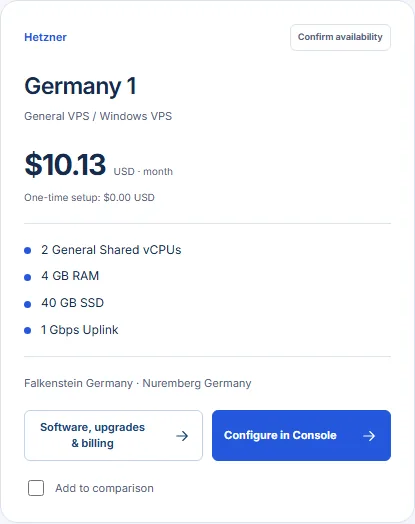
Use this simple rule to avoid a bad comparison: compare the configured total, not only the large number at the top of a card. A dedicated plan may have a setup charge; a GPU or hourly plan may have charges that continue while stopped. Rates and availability can change, so confirm the final amount in Console before ordering.
5. Apply the method to three common cases
- Small business website: begin with monthly VPS or web hosting. Compare the site’s measured memory use, update process, backups and who will maintain the server. Choose hosting if you do not need server administration; choose a VPS when you need OS or application control.
- Occasional AI experiment: confirm first that the model needs a GPU, its required VRAM and whether the runtime is supported. Compare an hourly GPU configuration against the expected active and stopped time. Do not estimate cost from GPU hours alone if storage or stopped time is billed.
- Busy application with predictable, sustained load: measure CPU peaks, memory and disk activity on the current system. Shortlist suitable monthly VPS plans and dedicated machines, then compare the actual CPU, disk layout, setup cost and operational responsibilities. A physical server is not automatically faster for every task.
6. Make the final decision in Console
Open each candidate in Console and repeat the same location, OS and option choices used in your notes. Check the final total and the service terms before submitting an order. If a candidate fails a hard requirement—unsupported OS, unsuitable location, insufficient RAM or a total above budget—remove it, even if its headline price looked attractive.
For a Linux-compatible workload, the 30-minute free trial can answer a focused question about the setup workflow or initial connectivity. Follow the practical trial test plan; a short trial cannot establish long-term uptime or sustained production performance. If you still cannot distinguish two plans, send your workload brief and both exact plan names to support so the comparison is about the configuration you will actually buy.