When does hourly GPU make sense for an AI project?
Plan AI experiments by active GPU hours, retained storage and useful work completed. See a dated GPU rate example and a practical cost checklist.
Updated

Hourly GPU access can be a good fit for an AI experiment that runs for a few scheduled hours. It can also be an expensive way to keep a model online around the clock. The useful question is not “Is the hourly rate low?” but “How many hours will this exact workload run, what must remain stored, and what happens when I stop it?” This guide gives you a worksheet for making that decision using the GhostVPS GPU Cloud service. It focuses on AI workloads; our general hourly versus monthly VPS guide covers broader server choices.
1. Give your AI workload a calendar
Write down one month of expected use. Separate time spent downloading a model and preparing an environment from time spent running inference or training. Include debugging, evaluation and retry time. A notebook used for two evenings a week has a very different schedule from an API that must respond all day. If you cannot estimate yet, plan a short pilot, record the actual start and stop times, then revise the schedule.
| Workload | What to record | Why it matters |
|---|---|---|
| Experiment or fine-tuning run | Number of sessions, setup and GPU hours per session | Short, scheduled runs are easier to turn off deliberately |
| Batch image or document processing | Jobs per week, items per job, retry time | Queueing work can reduce idle GPU time |
| Always-available inference API | Required availability, request peaks, idle hours | An hourly GPU may keep charging while waiting for traffic |
| Retained workspace | Model weights, datasets, outputs and their GB | Storage can continue to cost money after compute stops |
2. Separate initial credit from the GPU rate
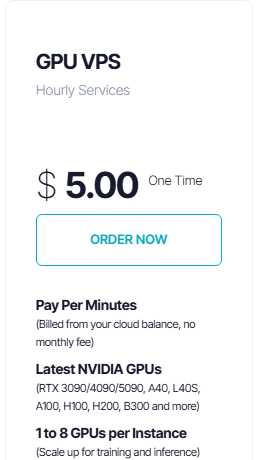
The public Console listing shows a $5 one-time entry for GPU VPS. That is initial cloud credit, not a promise that any GPU runs for $5 or that the hourly rate is fixed. In the Hourly Services category, select the GPU service and review the actual GPU model, count and storage before funding and deploying it.
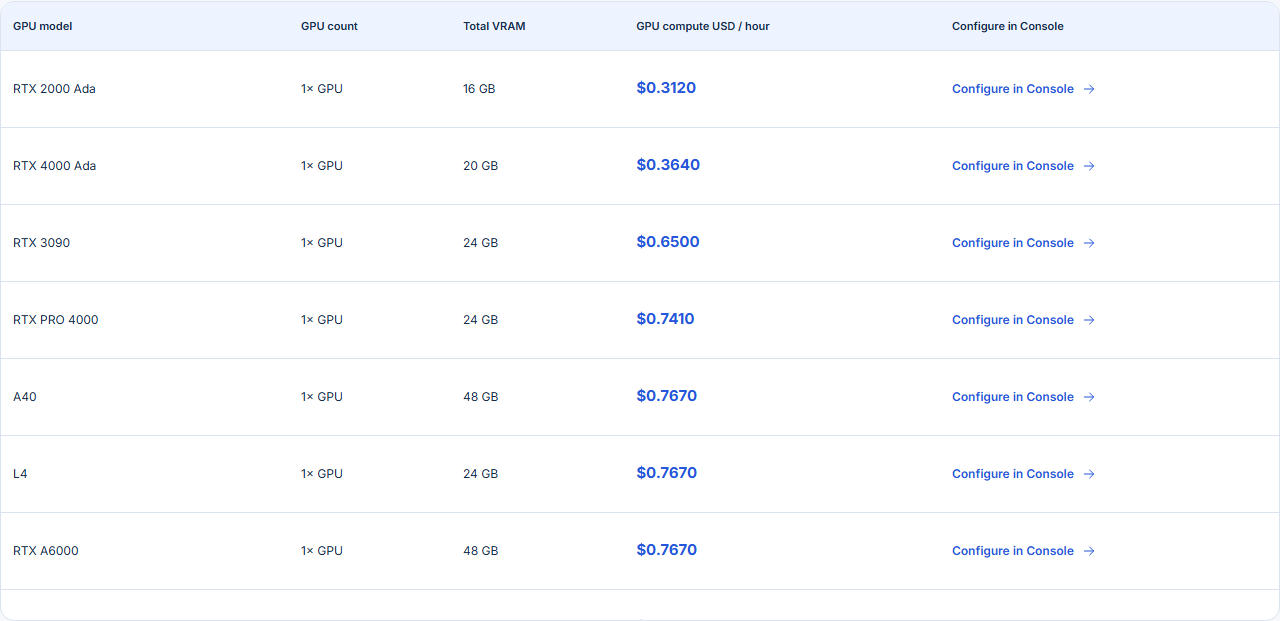
The GPU Cloud catalog publishes a per-hour GPU compute rate for each listed configuration. That number is a starting point for an estimate. The selected location, availability, persistent storage and final quote belong to the current Console configuration. GPU count also matters: two GPUs do not automatically double a model’s usable memory unless your software distributes the model across them. For sizing, use the separate VRAM guide.
3. Account for the data that stays behind
Before starting, decide where your model cache, datasets, notebooks and outputs should live. The product page distinguishes temporary container disk from a persistent volume mounted at /workspace; files on temporary storage can be lost on restart. It also states that retained persistent storage can be billed while the GPU is stopped. The running and stopped storage rates can differ. Confirm the exact storage choice and price in Console, keep an independent copy of important results, and do not treat “stopped” as “free.”
| Cost line | How to estimate it | Source to verify |
|---|---|---|
| GPU compute | Selected configuration rate × billable running time | Current GPU configuration in Console |
| Persistent storage while running | Chosen GB × applicable running storage rate × time | Selected volume quote in Console |
| Persistent storage while stopped | Retained GB × applicable stopped storage rate × time | Stopped-state terms in Console |
| Other charges | Add only items shown for your exact configuration | Final order and usage view |
Worked compute example, not a quote: the public catalog snapshot on 1 November 2026 listed one RTX 2000 Ada at $0.3120 per GPU compute hour. Twenty billable running hours at that snapshot rate would be $6.24 in compute alone (20 × $0.3120). It does not include retained storage, any other charge, changes in rate or billing granularity. Use your own selected configuration and the current Console quote for a decision.
4. Match the billing shape to the project
- Good candidate for an hourly GPU: a finite experiment, batch generation or scheduled evaluation with a clear stop time and a known data-retention plan.
- Needs a more careful comparison: a public AI API that must stay responsive continuously, a workflow that repeatedly downloads large models, or a team that leaves workspaces running between sessions.
- Start smaller when uncertain: test a representative model and record its actual memory, completion time and output quality before deciding that a larger GPU is necessary. Our repeatable GPU test guide provides that checklist.
Run a short paid pilot with a spending limit you can accept. Save the exact GPU configuration and selected storage, start and stop timestamps, the Console usage record and the amount of work completed. Afterward, calculate cost per useful job as well as cost per hour. That makes the next purchase decision much clearer than a headline GPU rate.
5. Check these five items before adding credit
- Is the chosen GPU and location currently available?
- How many GPUs and how much VRAM does the exact configuration have?
- Where will models and outputs persist, and what remains billed after stopping?
- How will you verify usage and stop or delete unused resources?
- Does the total estimated cost fit your planned experiment and retry budget?
If you cannot answer an item from the selected Console configuration, ask GhostVPS support before buying. Do not use a rate from an older screenshot as a final order price.
Reviewed 1 November 2026. Console screenshots show a public listing, not a live customer invoice. Rates and availability may change.